
What Should a Business Consider Before Installing Security Cameras?
Thinking of installing security cameras for your business? You're thinking an essential step towards securing your business; choosing cameras is one thing, but choosing where to install them and what areas require coverage and who will have access to the system is another one.
For businesses looking for security camera installation in Miami, the right setup depends on the property, daily operations, security concerns, and budget. A retail store may need coverage around entrances and checkout areas, while an office may prioritize reception areas, parking lots, and access points.
So, before investing in a system, here are a few things to consider from the point of view of CCTV install experts.
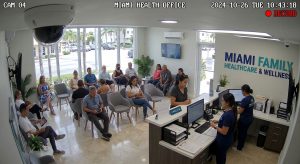
1. Identify the Areas You Need to Monitor
Start by identifying the areas where cameras would provide the most value. Installing cameras without a clear plan can leave important blind spots or create unnecessary overlap.
Walk through your property and consider the areas where incidents are most likely to occur or where visibility matters most. These may include:
- Main entrances and exits
- Reception areas and customer-facing spaces
- Parking lots and exterior entrances
- Storage rooms and inventory areas
- Loading docks and delivery entrances
- Hallways and other shared spaces
Think about what you need to see in each location. A camera monitoring an entrance may need to capture faces clearly, while a camera covering a parking lot may need a wider field of view.
The goal is not simply to install more cameras. It is to make sure the system covers the areas that matter to your business.
2. Choose the Right Type of Camera
Not every camera is designed for the same environment. The right choice depends on where the camera will be installed, the level of detail you need, lighting conditions, and the size of the area being monitored.
For example, outdoor cameras need to be suitable for weather exposure, while indoor cameras may be selected based on room size, lighting, and the amount of detail required.
Here are a few features worth considering:
Resolution: Higher resolution can help capture more detail, but the results also depend on camera placement, lighting, and distance from the subject.
Field of view: A wider field of view can cover more space, although it may provide less detail on objects farther away.
Night vision and low-light performance: If you need to monitor your property after business hours, check how the camera performs in low-light conditions.
Motion detection: Depending on the system, motion-based recording or notifications may help you identify activity without having to review every minute of footage.
Indoor and outdoor suitability: Make sure each camera is designed for its intended environment.
When planning a security camera installation in Miami, consider the conditions around your property, including outdoor exposure, lighting, and the areas you need to monitor throughout the day and night.
3. Decide How You Want to Access and Store Footage
A camera system is only useful if you can access the footage when you need it. Before choosing a solution, decide how recordings should be stored and how your team will review them.
There are two common approaches: local storage and cloud storage.
Local storage keeps recordings on equipment located at your property, such as a recorder or storage device. Depending on the system, this can provide convenient access to footage within your local network. However, the equipment itself needs appropriate protection and maintenance.
Cloud storage sends recordings to a remote storage service. Depending on the provider and plan, it may make remote access and footage management easier. You should also review storage limits, ongoing costs, internet requirements, and how recordings are protected.
Some systems support a combination of local and cloud storage.
Consider how many days of footage you need to retain, how many cameras will record, and how frequently your team may need to review recordings. These details affect storage capacity and system requirements.
If footage is important to your daily operations, make sure you understand what happens when a recorder fails, the internet connection is interrupted, or storage reaches its limit.
4. Check Whether You Need Remote Viewing
Business owners and managers are not always on-site. Remote viewing can make it easier to check your property from a phone or computer, depending on the system's capabilities.
This can be useful when you manage multiple locations, travel frequently, or need to review activity outside regular business hours.
Before selecting a system, ask:
- Can authorized users view live camera feeds remotely?
- Can they review recorded footage from a mobile device?
- Can different employees have different access permissions?
- Does remote viewing require a particular application or subscription?
- How is remote access secured?
Remote access should be convenient without making the system easier for unauthorized people to access. Use strong passwords, enable multifactor authentication when supported, keep devices updated, and limit access to people who need it.
Your camera system is part of your business technology environment, so its network connection and security deserve attention as well.
5. Consider Your Network and Cabling Requirements
Security cameras need a way to transmit video and, in many cases, receive power. The requirements depend on the equipment you choose.
Some cameras connect through Wi-Fi, while others use wired network connections. Power over Ethernet (PoE) can allow compatible cameras to receive power and transmit data through a single network cable.
Wired connections can be a practical choice for permanent installations, particularly when reliability and consistent connectivity are priorities. Wireless cameras may be suitable for certain locations, but signal strength, interference, power requirements, and network capacity still need to be considered.
Before installation, assess whether your existing network can support the additional devices. Multiple cameras transmitting video can place demands on network equipment and bandwidth, especially when footage is viewed remotely or uploaded to cloud storage.
For new offices, renovations, or larger installations, it is worth planning the cabling before equipment is mounted.
6. Protect the Camera System From Unauthorized Access
Security cameras help you monitor your property, but the camera system itself also needs protection.
Cameras, recorders, and remote viewing applications may be connected to your business network. If access is not properly managed, unauthorized users could potentially view footage, change settings, or interfere with the system.
To reduce these risks, consider the following measures:
- Change default passwords before using the equipment.
- Use strong, unique passwords for camera and recorder accounts.
- Enable multifactor authentication when available.
- Install firmware and software updates.
- Restrict administrative access to authorized personnel.
- Review which employees and third parties can view recordings.
- Avoid exposing camera management interfaces directly to the public internet unless there is a properly secured, necessary configuration.
You should also consider how the camera system fits into your wider cybersecurity practices. Protecting cameras is not just about the equipment itself. It is also about securing the accounts, network connections, and devices used to manage it.
7. Understand Your Privacy and Footage Retention Responsibilities
Before installing cameras, determine where recording is appropriate and who is allowed to access the footage.
Businesses should consider employee privacy, customer expectations, and applicable laws when deciding where cameras will be placed. Areas where people reasonably expect privacy require particular care, and audio recording may raise additional legal concerns.
You should also establish a clear policy for how long recordings are retained, who can review them, and when footage may be shared or deleted. The appropriate retention period depends on your business needs, contractual obligations, and applicable legal requirements.
For businesses in Miami, it is worth reviewing relevant Florida and federal requirements before finalizing camera placement and recording settings. If your business operates in a regulated industry, consult an appropriate legal or compliance professional when necessary.
A well-planned system should support your security goals while respecting privacy and limiting access to recorded information.
8. Plan for Installation, Maintenance, and Future Growth
The initial installation is only one part of owning a security camera system. You also need to consider how the system will be maintained and whether it can accommodate changes to your business.
Before choosing an installer, ask about the proposed camera locations, cable routing, equipment setup, user training, remote access configuration, and testing after installation. Make sure you understand who will help if a camera stops recording, a device loses connectivity, or you need to change user permissions.
It is also worth thinking ahead. If you plan to expand your office, add another location, or change the layout of your property, your camera system should be able to accommodate those needs where practical.
A professional assessment can help identify coverage gaps, network limitations, and installation requirements before they become more expensive problems.
How Much Does Business Security Camera Installation Cost in Miami?
The cost of security camera installation in Miami depends on the size of the property, the number and type of cameras, storage requirements, cabling needs, and the complexity of the installation.
For example, a small office with a few indoor cameras may have very different requirements from a retail property with several entrances, outdoor coverage, and extended recording needs.
When comparing proposals, look beyond the number of cameras and the initial equipment cost. Check whether the proposal includes installation, cabling, recording equipment, storage, remote access configuration, and any recurring software or cloud storage fees.
A site assessment can help determine what your property actually needs and reduce the risk of paying for unnecessary equipment or discovering coverage gaps after installation.
Choosing a Security Camera Installation Company in Miami
The installer you choose can affect how well your system performs after the equipment is in place. Look for a provider that takes the time to understand your property, explain the proposed setup, and address your questions about recording, remote access, network requirements, and ongoing support.
Before moving forward, ask whether the installer will assess camera placement, test the system after installation, explain how to access recorded footage, and help you understand maintenance requirements.
It is also helpful to work with a provider that understands how cameras connect to the rest of your business technology. Network configuration, cabling, user access, and cybersecurity can all affect the overall setup.
Frequently Asked Questions
How many security cameras does a business need?
The number depends on the property's size, layout, entrances, high-priority areas, and the level of detail needed. A site assessment can help identify the right camera locations and reduce blind spots without installing unnecessary equipment.
Can business security cameras work without internet?
Some systems can continue recording locally when the internet connection is unavailable, provided they have the necessary power, storage, and local connectivity. However, remote viewing and cloud-based features may be interrupted. Check the specific system's capabilities before installation.
Should a business choose wired or wireless security cameras?
Wired cameras can offer a reliable connection for permanent installations, while wireless cameras may be suitable where running cable is difficult. The decision depends on signal strength, power availability, network capacity, installation requirements, and the environment.
How long should a business keep security camera footage?
There is no single retention period that fits every business. Consider the purpose of recording, how quickly incidents are normally discovered, available storage, and applicable legal or contractual requirements. Set a retention policy that meets your needs without keeping footage longer than necessary.
Can I view my business security cameras from my phone?
Many modern systems support remote viewing through a mobile application or web interface. Availability depends on the equipment and service plan. Remote access should be configured securely, with strong authentication and access limited to authorized users.
Do security cameras need their own network?
Not necessarily. Some camera systems can operate on an existing business network, while others may benefit from network separation or dedicated infrastructure. The best approach depends on the number of cameras, bandwidth requirements, equipment, and security needs.
Plan Your Business Security Camera Installation
Choosing a security camera system starts with understanding what you need to monitor, how you want to access recordings, and what your property requires for reliable installation.
If your business is planning a new system or replacing older cameras, BizNet Technology can help you explore security camera installation options for your property in Miami, Broward, Palm Beach and Fort Lauderdale.
Contact BizNet Technology at (305) 256-2024 or visit our security camera installation page to get started.


